
Download Generate Icons – AI‑Powered Image Creation, Free Credits, Secure Web App
Overview
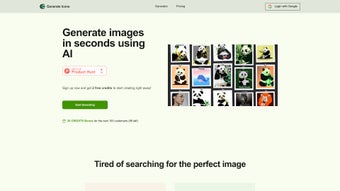
Generate Icons is a cutting‑edge, browser‑based graphics tool that puts artificial‑intelligence generation directly in the hands of designers, marketers, and small‑business owners. Instead of juggling expensive design agencies or learning complex vector suites, users simply log in, select a style, type a short description, and let the AI render a high‑quality icon in seconds. The platform operates on a transparent credit system—one credit equals one generated image—so you only pay for what you actually use.
This model is ideal for freelancers juggling multiple client projects, agencies that need to churn out dozens of assets per week, or startups that want professional visuals without breaking the budget. Pricing is flexible: you can purchase credits in small packs for occasional use or bulk bundles for heavy‑duty workloads, and each plan includes automatic updates to the underlying AI models at no extra cost. Ownership rights are granted in full; every image you download is yours to use commercially, modify, or resell without additional licensing fees.
While the service does not offer refunds—a policy that reflects the real‑time computational expense of each generation—the overall value proposition remains strong: rapid, secure, and scalable icon creation that eliminates the typical bottlenecks of traditional design pipelines. Whether you need a sleek flat‑design app icon, a detailed 3‑D badge, or a playful cartoon‑style logo, Generate Icons delivers consistent quality across a broad range of visual styles, making it a versatile addition to any creative workflow.
Core Features & Benefits
- AI‑driven image generation that creates unique icons in seconds.
- Credit‑based pricing—pay only for the images you need, no hidden subscriptions.
- Unlimited generation while credits are available, ideal for rapid campaign rollouts.
- Full commercial rights to every image, eliminating licensing worries.
- Intuitive web interface with real‑time preview and export options (PNG, SVG, JPG).
- Customizable style parameters (color palette, line thickness, flat vs. 3D).
- Secure cloud processing with end‑to‑end encryption for data privacy.
- Regular AI model updates to stay ahead of design trends.
- Responsive design works on desktops, tablets, and smartphones.
- API access for developers who want to integrate icon generation into their own apps.
The feature set is deliberately streamlined to keep the user experience frictionless. By focusing on the most critical aspects of icon creation—speed, quality, and ownership—Generate Icons eliminates the typical bottlenecks associated with hiring a graphic designer or learning complex design software. The credit system also provides transparent budgeting: you can forecast costs per project and avoid surprise invoices.
For agencies that churn out dozens of assets per week, bulk credit packages deliver a cost‑effective solution that scales with demand. Moreover, the platform’s continuous AI improvements mean that each new generation benefits from the latest artistic techniques without any manual updates on your part. The API layer adds a further layer of flexibility, allowing developers to embed the generation engine into content‑management systems, automated marketing pipelines, or mobile apps, turning a single‑click UI into a programmable service.
Finally, the responsive layout ensures that whether you’re at a standing desk, a coffee shop, or traveling with a tablet, the tool behaves consistently, delivering the same high‑resolution output across Windows, macOS, Linux, Android, and iOS browsers.
Installation, Usage & Compatibility
As a pure web application, Generate Icons requires no traditional installation. Simply navigate to the official website, create an account, and you’re ready to start generating images. The onboarding wizard guides you through selecting a style, entering descriptive keywords, and allocating the required credits. Once you click “Generate,” the AI model processes the request on secure servers and returns a downloadable file within moments.
Operating system support: The platform is fully compatible with all modern browsers on Windows, macOS, Linux, Android, and iOS. Its responsive UI adapts to different screen sizes, allowing you to design on a desktop workstation, a MacBook, or even a mobile phone while on the go. Because everything runs in the cloud, there are no system‑specific dependencies, drivers, or plugins to install.
For power users, an optional API key can be generated from the dashboard. This key enables programmatic access via RESTful calls, making it easy to embed icon generation into CI/CD pipelines, content management systems, or custom mobile apps. Documentation includes example code snippets in JavaScript, Python, and cURL, ensuring a smooth integration experience regardless of your development stack.
The workflow is deliberately simple: 1) Choose a template or start from scratch, 2) Enter descriptive text (e.g., “eco‑friendly leaf badge”), 3) Adjust style sliders, 4) Confirm credit consumption, 5) Download the final asset. Every generation is logged in your account history, so you can revisit past designs, re‑download, or regenerate variations with a single click. This level of transparency helps teams maintain version control and audit usage for budgeting purposes, while the built‑in preview mode lets you compare multiple style options before committing a credit.
Pros, Cons, FAQ & Conclusion
Pros
- Fast AI generation—icons ready in seconds.
- Pay‑as‑you‑go credit system fits any budget.
- Full commercial rights eliminate licensing headaches.
- Browser‑based, no installation required.
- Responsive design works on all major operating systems.
- API access for developers and automation.
- Regular model updates keep designs modern.
- Secure, encrypted processing protects your data.
Cons
- No refund policy may deter cautious first‑time buyers.
- Limited to one image per credit—bulk variations require more credits.
- Advanced customization may still need a human designer for niche styles.
- Dependence on an internet connection; offline use is not possible.
Frequently Asked Questions
How many credits do I need for a typical project?
Most small marketing campaigns require 5‑10 icons, so purchasing a 20‑credit pack provides a comfortable buffer while keeping costs low.
Can I edit the generated icons after download?
Yes. Files are provided in PNG, JPG, and SVG formats. SVG files are fully editable in vector editors such as Adobe Illustrator or Inkscape.
Is my data secure during the generation process?
All requests are encrypted via HTTPS, and images are stored temporarily on secure servers that are automatically purged after download.
Do I retain ownership of the images?
Yes. Every image generated belongs to you with unlimited commercial rights, allowing unrestricted use in branding, advertising, or resale.
What happens if I run out of credits?
When credits are exhausted, the platform simply blocks further generation until you purchase additional credits. Your existing images remain available for download.
Conclusion & Call to Action
Generate Icons delivers on its promise of rapid, AI‑powered image creation while keeping costs transparent through a credit‑based model. The combination of full commercial rights, cross‑platform accessibility, and an easy‑to‑use interface makes it a strong contender for anyone needing high‑quality icons without hiring a designer. Although the lack of refunds and the per‑credit limitation may be a consideration, the overall value proposition—speed, flexibility, and ownership—outweighs these minor drawbacks. If you’re ready to accelerate your visual content pipeline, download Generate Icons today, purchase a credit pack that fits your budget, and start creating professional icons in seconds.



.png)



